New York City Multilayer Laser Cut Files for Creative Projects
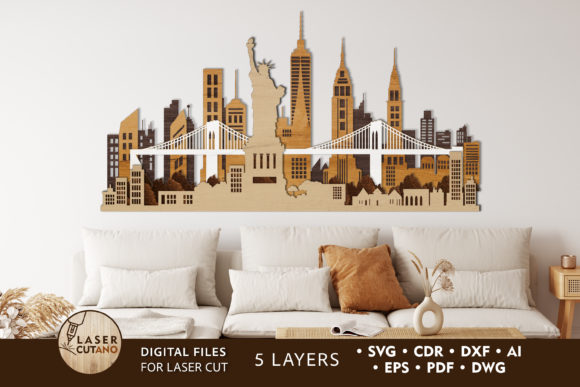
There's a certain magic in the silhouette of a city skyline, and capturing that energy for your projects is now more accessible than ever. The New York City Multilayer Laser Cut Files offer a stunning, dimensional way to bring the iconic Manhattan horizon into your work. This isn't just a flat image; it's a carefully crafted, five-layer digital template designed to create depth and shadow, transforming a simple outline into a captivating piece of art.
These files are a fantastic resource for anyone looking to add a sophisticated, urban touch to their creations. The design is prepared specifically for laser cutting, CNC routing, and other cutting machines, ensuring clean, precise results. You'll receive the complete package in multiple formats—AI, SVG, DXF, DWG, CDR, EPS, and PDF—ready to download and use after a simple unzipping. The finished piece measures a versatile 20 x 10.5 inches, making it perfect for wall decor, signage, or a standout model.
Why Choose a Multilayer Design?
The appeal lies in the dimension. A single-layer city skyline SVG has its place, but a multilayer layout adds physical depth and visual interest that flat designs cannot match. Each layer can be cut from different materials or even painted in varying shades, creating a dynamic scene. Imagine a Brooklyn Bridge layer in a dark walnut wood, with the city lights behind it cut from a translucent acrylic that you can backlight. The ability to add a light source behind the panel truly elevates the atmosphere, making the city skyline glow.
This creative flexibility makes these design assets incredibly useful. The recommended materials—like plywood, MDF, acrylic, plexiglas, metal, cardboard, or paper—open up endless possibilities. A thicker 3-6mm wood creates a sturdy, permanent piece for home decor, while a delicate paper version can become a unique wedding invitation backdrop or a striking poster design element.
Practical Applications for Your Ideas
Think beyond a simple wall hanging. This versatile template can be adapted for a wide range of projects:
- Brand Identity & Packaging: Use the skyline outline in logo design or on packaging for a product with a New York theme. The layered effect adds a premium, tactile quality to your brand identity.
- Editorial & Poster Design: Incorporate the design into magazine layouts, book covers, or event posters to instantly convey an urban, cosmopolitan vibe.
- Digital Products & Social Media: Create eye-catching social media graphics, website banners, or digital stationery. The clean lines work well in modern typography contexts.
- Merchandise & Invitations: Craft unique merchandise like layered wood ornaments or design unforgettable invitations for galas, birthdays, or corporate events with a NYC theme.
Tips for Using Your Design Files
To get the best results, keep a few practical considerations in mind. While you can scale the design up for a large installation, reducing the size too much may affect the intricate details, especially the delicate bridge cables and building windows. Always test a small section with your chosen material and machine settings first.
When it comes to presentation, the font pairing for any accompanying text is key. For a cohesive look, pair the detailed skyline with a clean, modern sans-serif font for headings, or a elegant serif font for a more classic, editorial feel. The design itself is a strong visual asset, so supporting typography should complement, not compete.
Ultimately, this multilayer layout is more than just a cutting file; it's a creative foundation. It provides the precision of a professional design asset with the flexibility of a DIY project. Whether you're a designer creating client work, a hobbyist crafting a personalized gift, or a small business owner developing branded materials, having a high-quality, adaptable template like this saves time and inspires new ideas. The right design asset helps you achieve a polished, professional result that truly stands out.